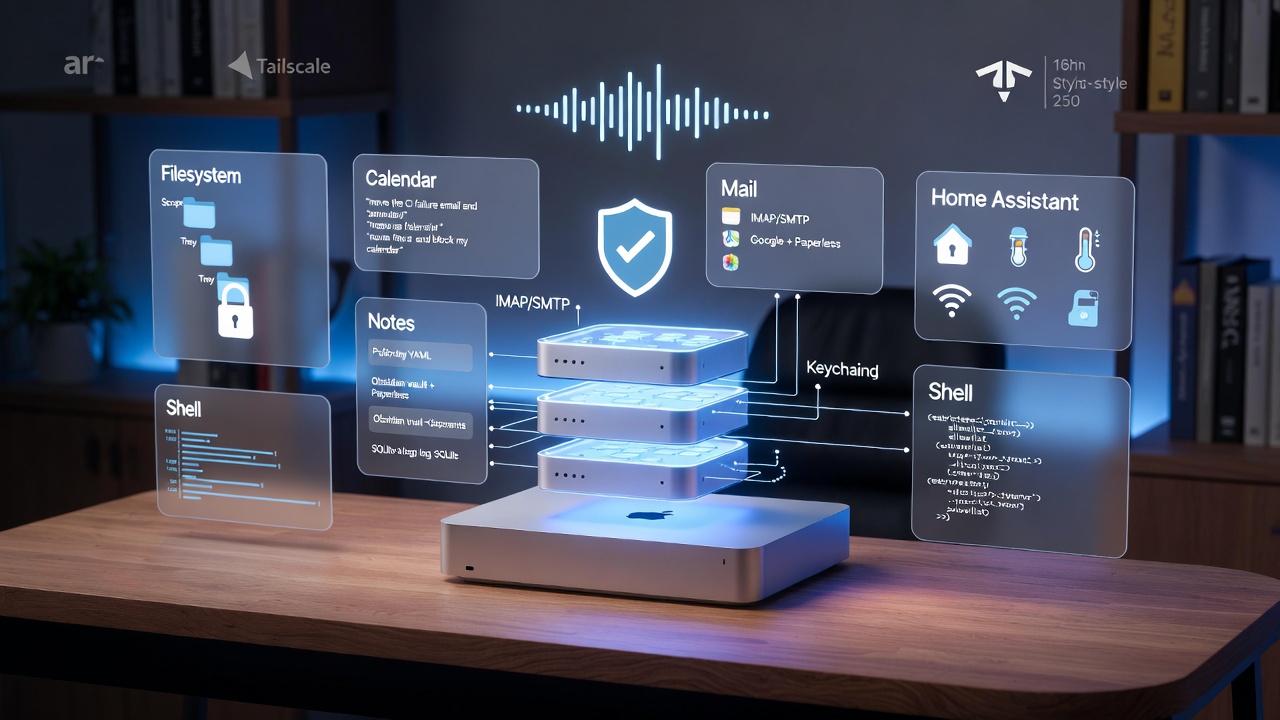
TL;DR
- Problem: a local agent that can only chat is a toy. The value is in what it can do.
- Answer: Model Context Protocol servers, running locally on the Mac Studio, expose filesystem, calendar, mail, notes, and a handful of custom tools.
- Runtime: one supervisord config, a small router, and per-server allowlists so nothing escapes its box.
- Security posture: no tool runs without a policy, secrets live in the macOS Keychain, and every call is logged to a local SQLite file I can grep at 11pm.
- Result: I can phone the agent (see How to Phone Your Home AI Agent), ask “move the CI failure email to triage and put a 15 minute hold on my calendar at 4”, and it actually does it.
Why MCP and Not “Just Functions”
Before MCP I had a directory of half-finished Python shims. Each one spoke a slightly different dialect: one took JSON arguments, one took positional args, one returned markdown and one returned a dict. Adding a new tool meant editing the agent prompt, the router, and the caller.
MCP fixes the part that actually hurts. It standardises three things:
- Discovery - the agent asks a server “what do you do?” and gets a schema back.
- Invocation - every tool is called the same way, with typed arguments.
- Streaming - long-running tools stream progress back over the same channel.
That is not a revolution, but it means I stopped writing glue. When Anthropic or someone else ships a new capability, I point my agent at it and the tools appear. When I want to write my own, I follow the MCP spec and it fits in without touching the agent.
The Claude Code source leak made this concrete for me. The agent loop is surprisingly thin - the interesting work has moved into the tool surface. MCP is the part that makes that surface reusable.
The Stack on My Mac Studio
I run a Mac Studio M2 Ultra with 128 GB. The agent is a local 30B-class model via Ollama for fast paths, with Claude API as a fallback when the task needs more thinking. Everything below runs on the same machine, supervised by one process.
Mac Studio
├── agent-host          (LiveKit agent, phone-in + local chat)
├── mcp-router          (routes tool calls by policy)
├── mcp-filesystem      (scoped to ~/agent-workspace)
├── mcp-calendar        (Google Calendar, read + write)
├── mcp-mail            (IMAP read, SMTP send with confirmation)
├── mcp-notes           (Paperless-ngx + Obsidian vault)
├── mcp-homeassistant   (Home Assistant local API)
└── mcp-shell           (restricted, allowlisted commands only)
Nothing here is exposed to the public internet. Reach is done over Tailscale, which I already use for the phone setup. If a tool can write, it either has a narrow scope (the filesystem server is chrooted to one directory) or it goes through a confirmation step (mail, shell).
Supervisord, not Docker
I tried Docker first. On Apple Silicon, the overhead of spinning up a handful of small Python services under Docker Desktop was genuinely painful - cold start times mattered when the agent was waiting to reply on a phone call. I moved everything to supervisord with a single config file. Each server is a short-lived process that can be restarted in under a second. That is the right tradeoff for a single-user box.
The Servers, One at a Time
Filesystem
The single most useful tool. I use the reference filesystem MCP server with its root set to ~/agent-workspace. The agent can read, write, list, and move files, but only inside that tree. Anything that needs to leave that directory is a deliberate cp call through the shell server, which I have to approve.
Two things I changed from the default:
- Denylist for extensions. The server will refuse to open
.keychain,.pem,.p12,.env, even inside the workspace. I have been burned before by an agent that “helpfully” read a credentials file it had no business touching. - Size cap. Files over 2 MB return a summary instead of full contents. Most of the time this is what you want, and it stops the agent from pulling 40 MB of logs into its context.
Calendar
Google Calendar, read-write, through a lightweight Node server I wrote on top of the official Google API client. The tricky part was OAuth - I did not want a browser popup every time the agent restarted. I stored a refresh token in the macOS Keychain with security add-generic-password and the server reads it at boot. No token file on disk, no environment variable leaking into a process list.
The calendar tool can do three things: list events in a range, create an event, and move an event. Deleting is not exposed. If the agent thinks an event should be deleted it has to ask me. I have not yet regretted this.
Read is easy - IMAP with a read-only connection. Send is the dangerous one. My rule is that the agent can draft a message with the mail server, but sending requires a confirmation through whatever channel I am on. If I am on a phone call with the agent, it reads the draft back and waits for a “yes”. If I am at my desk it drops a notification I click.
This is the single most important design decision in the whole setup. An agent that can autonomously send email is a foghorn pointed at your contacts. An agent that drafts and waits is a genuinely useful assistant.
Notes
Two sources: a Paperless-ngx instance for scanned documents, and my Obsidian vault for working notes. The MCP server here is a thin wrapper that exposes search and fetch across both. The agent does not write to either - notes are the source of truth, and I do not want an agent rewriting my second brain while I am not looking.
The useful pattern is “remind me what I wrote about X”. Half the time the agent surfaces something I had forgotten and the other half it confirms I never wrote it down, which is nearly as useful.
Home Assistant
My Home Assistant runs on a separate box on the LAN. The MCP server hits the local API directly - no cloud hop. Exposed actions are deliberately boring: turn lights on and off, set a thermostat temperature, check whether a door is open. Nothing that can lock me out of my house or run a heating element unattended.
I found this is where the voice setup earns its keep. “Turn the office light off and set a 20 minute timer” while I am halfway down the stairs is the most natural interface I have ever used for home automation.
Shell, Carefully
A shell MCP server is the nuclear option. I run one, but with an allowlist of commands (git, gh, make, pytest, a few project-specific scripts) and a hard denylist of anything with rm, sudo, curl | sh, or redirects outside the workspace. Every call is logged with its arguments.
Would I recommend this to someone just starting out? No. Add it last, once you trust the rest of the stack. Most of the value is in the typed servers above.
The Router and the Policies
All seven servers sit behind a tiny router I wrote. Its job is not clever: it takes a tool call from the agent, looks up a policy file, and decides whether to pass it through, prompt for confirmation, or refuse.
The policy file is YAML and lives in the repo:
filesystem:
  read: allow
  write:
    scope: ~/agent-workspace
    deny_extensions: [".env", ".pem", ".keychain"]
mail:
  read: allow
  send: confirm
calendar:
  create: allow
  delete: deny
shell:
  commands:
    allow: [git, gh, make, pytest, ./scripts/*]
    deny_patterns: ["rm ", "sudo ", "curl * | sh"]
This is the file I actually reach for when something feels wrong. Tightening a policy is a one-line change. That property is worth more than any clever prompt.
What I Got Wrong First
A few things I tried that did not work, in case you are about to try them:
- One giant MCP server. I started by putting every capability in a single Python process. It became unreviewable within a week. Splitting by domain made each server small enough to read in one sitting.
- Letting the agent pick its own tools. Early on I exposed the full list to the model and let it choose. It over-reached - reading mail to “get context” when the task was a filesystem rename. I now scope tools per task: phone-call sessions get calendar, mail, and notes; coding sessions get filesystem and shell. Nothing else.
- No logging. For two weeks I had no audit trail, and I could not answer “did it actually do what I think it did?” A SQLite log of every tool call, with arguments and result, fixed that and surfaced two bugs in my own policies I had not noticed.
- Trusting the model to ask for confirmation. It will not, reliably. Confirmation has to be enforced by the router, not by the prompt.
Where This Goes Next
The next thing on my list is per-task memory that the tools can read. Right now the agent has session memory, but it cannot say “last Tuesday we tried restarting the Postgres container and it worked”. That is a memory MCP server, and it is the bridge between what Hermes Agent is doing with persistent state and what my own stack can do today.
After that: a tool for my personal AI dev stack - project-level context, so the agent knows which repo I am in and which conventions apply without being told every time.
If you are running a Mac Studio and a local model, MCP is the part that turns a chat toy into an assistant. The voice pipeline is the demo. The tools are the product.
Further Reading
- Model Context Protocol specification
- Official MCP servers repository
- Anthropic’s MCP introduction
- Home Assistant local API docs
- LiveKit Agents docs