TL;DR
- The order you learn AI tools matters as much as which tools you learn - most people start with terminal agents or editors before they understand how models actually fail
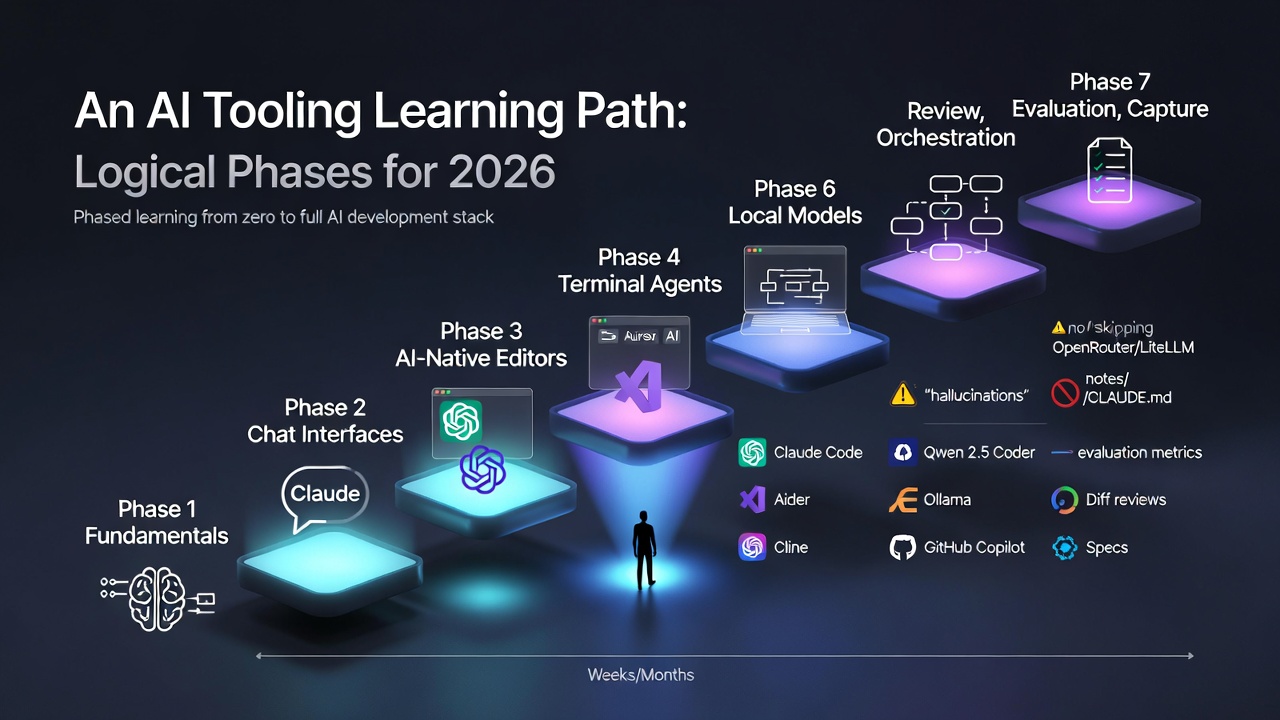
- The seven-phase path runs: fundamentals, chat interfaces, AI-native editors, terminal agents, local models, orchestration, and review and evaluation
- Terminal agents (Claude Code, Cline, Aider) represent the biggest mindset shift - you move from driving with suggestions to specifying and letting the model execute
- Local models via Ollama belong in phase five, once you have felt the pain of API costs and know which tasks actually need frontier capability
- Review, evaluation, and capture (phase seven) is the phase most developers skip - and the one that separates AI-curious from AI-competent
The hardest part of learning AI tooling in 2026 is not any single tool. It is the order you meet them in.
Most people start in the wrong place. They install a terminal agent before they have ever sat with a chat UI long enough to understand how models fail. They buy a Cursor subscription before they have written a single decent prompt. They wire up local models with Ollama before they know which tasks actually benefit from running offline.
This post is the phased path I would recommend to someone starting from scratch today. Each phase has a clear outcome, builds on the last, and has a natural point where you graduate to the next layer.
Why Phases Matter
AI tooling compounds. A terminal agent is much more useful once you know how to write a spec. Local models are only worth configuring once you have felt the pain of API costs. Review workflows only make sense once you have been burned by a confident-but-wrong implementation.
If you try to absorb it all at once, you end up with a stack of tools you do not trust and habits you cannot defend. The goal of a phased path is to internalise each layer before adding the next.
Phase 1: Fundamentals - Learn How Models Actually Work
Outcome: You can describe, in your own words, what a large language model is doing when it responds to you.
Before you touch a single developer tool, spend a few hours on the mental model. Not the math, not the linear algebra - just enough to stop treating models as magic.
Useful starting points:
- What is ChatGPT doing, and why does it work? by Stephen Wolfram
- Elements of AI for a gentle, non-technical introduction
- Fast.ai’s Practical Deep Learning if you want a top-down, build-first course
- The Prompt Engineering Guide for a broad survey of prompting techniques
Things worth understanding at this stage:
- Tokens, context windows, and why both matter
- The difference between a base model, an instruction-tuned model, and a reasoning model
- Why models hallucinate and why confidence is not correctness
- The basic shape of a transformer, at an intuition level
You will come back to these ideas in every later phase. See my AI Explainers page for a curated list of deeper resources.
Phase 2: Chat Interfaces - Build Prompting Fluency
Outcome: You can reliably get useful output from a frontier chat model on a non-trivial task.
Pick one chat interface and live in it for a few weeks. The goal is not to sample every product - it is to develop instincts for how frontier models respond to different kinds of framing.
Reasonable starting points:
- Claude for long, structured reasoning
- ChatGPT for breadth of features and image generation
- Gemini if you are already deep in the Google ecosystem
- Perplexity when you need cited, research-first answers
What to practise:
- Writing specs, not just questions
- Providing context explicitly rather than hoping the model will infer it
- Iterating on prompts when output is weak, instead of giving up or accepting mediocrity
- Noticing where a model confidently invents things
You graduate from this phase when you can get a model to help with a real work task - a document, a plan, a piece of analysis - and the result is genuinely useful rather than impressively shaped filler.
Phase 3: AI-Native Editors - Bring AI Into Your Flow
Outcome: You can stay in flow state while using AI for quick edits, refactors, and inline explanations.
Once prompting feels natural, move the assistant into your editor. This is where AI starts to affect the shape of your day rather than just the odd task.
The two dominant choices in 2026:
- Cursor AI for an AI-native editor with codebase-aware chat
- GitHub Copilot inside VS Code or JetBrains if you prefer to keep your existing editor
Either works. What matters is that you build habits around inline edits, codebase-aware chat, and quick transformations. See Claude Code vs Cursor for a breakdown of where each fits.
Skills to develop here:
- Using inline commands (Cmd+K in Cursor, equivalent in Copilot) for small, scoped edits
- Asking codebase questions before diving into unfamiliar files
- Recognising when the suggestion is wrong fast enough that you do not accept it on autopilot
- Keeping diffs small so review stays honest
This phase tends to reshape how quickly you move through routine work. It is also the phase where most people stop - which is why their AI workflow caps out early.
Phase 4: Terminal Agents - Take On Multi-File Work
Outcome: You can hand off a non-trivial, multi-file task to an agent and review the result critically.
Inline edits are great for small changes. They fall apart on anything that spans files, requires running tests in a loop, or needs deeper reasoning about a codebase.
That is the job of a terminal agent:
- Claude Code - Anthropic’s official CLI, strong on repo-wide reasoning
- Cline - an open-source autonomous agent that plugs into VS Code
- Aider - focused on iterative, test-driven workflows
The mindset shift in this phase is important. With an editor assistant, you are driving and the model is suggesting. With a terminal agent, you are specifying and the model is executing. The prompt becomes a brief, not a keystroke.
What to practise:
- Writing clear task briefs before invoking the agent
- Reviewing diffs carefully instead of assuming the agent got it right
- Running tests as part of the loop, not as an afterthought
- Knowing when to stop an agent that has gone off course
You graduate from this phase when you trust yourself to review agent output, not when you trust the agent.
Phase 5: Local Models - Control Cost and Latency
Outcome: You can handle the cheap end of your workload without hitting a paid API.
By now you are spending real money on frontier models and feeling the latency of every round trip. This is the right moment to introduce a local tier.
The practical starting stack:
- Ollama for running models locally with minimal setup
- A coding model like Qwen 2.5 Coder or Llama 3.3 for inline completions
- Open WebUI if you want a local chat interface
- LM Studio as a GUI-first alternative to Ollama
Tasks that belong on a local tier:
- Boilerplate and scaffolding
- Repetitive transforms (renaming, formatting, small refactors)
- Offline work on a plane or train
- First-pass drafts you will clean up with a stronger model
For hardware context, see Which Mac Studio Should You Buy for Running LLMs Locally? and Local vs Cloud AI in 2026.
The goal is not ideological - it is to stop paying frontier prices for work that does not need frontier capability.
Phase 6: Orchestration and Spec-Driven Development
Outcome: You can design a workflow where each model and tool has a clear job, coordinated by a spec.
At this point you have a cluster of tools. The risk is that they all overlap, contradict each other, and turn your workflow into noise.
Two ideas clean this up:
Model routing. Use something like OpenRouter or LiteLLM to send each task to the right model - Haiku or a local model for cheap work, Sonnet for most coding, Opus for hard reasoning. See my Personal AI Dev Stack for a concrete example.
Spec-driven development. Tools like GitHub Spec Kit force you to write down requirements, constraints, and acceptance criteria before implementation. The spec becomes the shared artefact that every tool in your stack works against.
The shift in this phase is going from “which tool should I use?” to “which responsibility belongs in the stack, and which tool fits each one?”
Phase 7: Review, Evaluation, and Capture
Outcome: You have habits that catch bad output before it ships, and a system that turns one-off work into reusable leverage.
This is the phase most developers skip, and it is the one that separates AI-curious from AI-competent.
Review: Never let the tool that generated the code also be the tool that reviews it. Run a separate review pass, with a different model or a much more critical prompt. Look for failures, not validation. See Claude Code Review for how this looks in practice.
Evaluation: For anything you rely on repeatedly, build a small evaluation set - a handful of inputs where you know what good output looks like. Run your prompt or workflow against them whenever you change models or providers.
Capture: Keep a lightweight store of prompts, specs, setup notes, and architectural decisions. Claude Skills, CLAUDE.md files, and a plain notes directory all work. Without a capture habit, every session starts from too close to zero.
A Rough Timeline
There is no prize for speed, but here is a realistic pace for someone doing this alongside regular work:
| Phase | Focus | Realistic Time |
|---|---|---|
| 1 | Fundamentals | 1 - 2 weeks of reading on the side |
| 2 | Chat interfaces | 2 - 4 weeks of daily use |
| 3 | AI-native editor | 2 - 4 weeks to build habits |
| 4 | Terminal agents | 4 - 8 weeks of real project work |
| 5 | Local models | A weekend to set up, longer to refine |
| 6 | Orchestration and specs | Ongoing, evolves with your projects |
| 7 | Review, evaluation, capture | Forever - these are habits, not a stage |
You do not need to finish Phase 3 before starting Phase 4. The phases are a rough ordering, not a gate system. But skipping ahead without the earlier instincts tends to leave gaps that show up later as bad habits.
What To Avoid On The Way Up
A few patterns that slow people down:
- Collecting tools instead of using them. A shelf full of unused subscriptions is worse than one tool you know deeply.
- Trusting one frontier model for everything. Powerful is not the same as consistently correct.
- Skipping the fundamentals. If you do not understand why models hallucinate, you will be blindsided every time it matters.
- Avoiding the terminal. Editor integrations are comfortable, but terminal agents unlock a different class of work.
- Treating generation and review as one step. They are different jobs.
See AI Resources and Best Practices for a longer list of official guides to lean on along the way.
Closing Thought
The goal of this path is not to turn you into someone who has tried every tool. It is to leave you with a working mental model of what each layer of the AI stack is for, and the judgement to pick the right one for the task in front of you.
The tools will keep changing. Claude 5, GPT-6, and whatever agent framework is hot next quarter will all arrive faster than most people can evaluate them. But the shape of the stack - foundations, chat, editor, agent, local tier, orchestration, review - is stable enough to build a career on.
Start at Phase 1. Do not skip ahead. And do not confuse “I have used this tool once” with “I understand where it belongs.”