In-depth exploration of AI in practice: building and deploying AI agents that work, designing developer workflows around Claude and other LLMs, critical analysis of AI safety and reliability, and the real shifts happening in careers, skills, and how we work. This section mixes tactical guides (how to actually build with AI), strategic analysis (what’s hype vs. what matters), and deeper dives into the tools and systems reshaping software development and knowledge work.

The Architect vs The Builder: Redefining Engineering Roles in 2026

TL;DR AI has collapsed the middle rungs of the engineering ladder by automating execution - the junior-to-architect progression no longer works the way it did The emerging split is two human roles: Architects who decide what to build and why, and Builders who turn architectural decisions into precise, testable specifications Neither role exists to write code - code-writing is incidental to both, and AI handles the bulk of implementation The two paths require genuinely different skills that do not build cleanly on each other; taste for architectural judgment and clarity for specification are separate capabilities If you are a junior engineer in 2026, you need to choose your path now - the traditional ladder is a trap, and “I write good code” is no longer a sufficient value proposition For forty years, the engineering career ladder has looked like this: ...

April 6, 2026 · 7 min · James M

What Does 'Expertise' Mean When AI Can Pass Any Exam?

TL;DR AI can now pass virtually every professional exam, breaking the long-held assumption that passing an exam equals having expertise What exams actually tested was knowledge retrieval under pressure - a bottleneck that no longer exists when machines can retrieve and apply knowledge better than any human Real expertise is what remains after knowledge retrieval is automated: judgment, integration of context, responsibility, and taste - none of which appear on any exam Professions built on credentialing (law, medicine, engineering) are being forced to confront that their proxies for expertise never measured the thing they cared about New models of assessment - portfolio-based credentialing, apprenticeship, outcomes tracking, and community reputation - will replace exams, but none of them scale as easily In 2023, Claude passed the bar exam. In 2024, it passed the CPA exam and medical licensing exams. By 2026, there’s barely an exam left that AI can’t pass, often on the first try. ...

April 6, 2026 · 7 min · James M

What Actually Belongs in My AI Dev Stack in 2026

TL;DR A single AI tool cannot handle everything - a proper AI dev stack in 2026 needs distinct layers for spec writing, fast editing, heavy agentic work, cheap model tasks, review, research, and capture Spec-driven development is the most underused part: writing requirements and acceptance criteria before generation dramatically improves AI output and reduces wasted iterations Tools like Cursor AI handle fast, in-flow editing while Claude Code or Cline are better suited to multi-file refactors and autonomous implementation from specs Letting the same model that generated code also review it is a weak loop - a separate review pass with a different model or explicitly critical prompt is essential The real shift is treating AI not as a bolt-on assistant but as part of the workflow architecture itself, with each tool assigned a clear, specific responsibility There is a big difference between using AI for development and having an actual AI development stack. ...

April 6, 2026 · 9 min · James M

GPU Servers vs AI API Credits: The Real Cost Breakdown (2026)

TL;DR The core trade-off is pay-per-use (APIs) vs pay-for-capacity (GPUs) - APIs are cheaper at low volume, GPUs win massively at high volume (100M+ tokens/day) The break-even point for GPU self-hosting sits around 2 to 5 million tokens per day for premium-model workloads - below that, APIs almost always win GPU utilisation is the most important variable: at less than 50-60% utilisation, self-hosted inference costs more per token than just calling an API Hidden costs matter - real GPU spend is 2x to 5x the raw hardware price once you add DevOps, scaling, monitoring, and networking; API costs can also balloon from poor prompt design and multi-step agent loops Most serious production systems land on a hybrid architecture: APIs for complex reasoning and long-context work, GPUs for bulk inference, embeddings, and fine-tuned models If you’re building anything with LLMs right now, you’ll hit this question sooner than you expect: ...

April 5, 2026 · 5 min · James M

GitHub Spec Kit in 2026: SDD Goes Mainstream 🚀

TL;DR GitHub Spec Kit reached v0.5.0 in 2026, evolving from a documentation toolkit into a full extensibility platform for AI-assisted development Claude Code CLI is now a native skill within Spec Kit, making spec-to-code pipelines seamless and built-in The ecosystem has exploded with dedicated tools like AWS Kiro and Tessl, while multi-agent support covers Copilot, Cursor, Gemini CLI, and more Spec-Driven Development prevents architectural drift by making the spec the single source of truth - versioned, reviewable, and respected by AI agents Getting started is now low-effort: write a spec.md, pick any AI tool, and let the spec drive implementation Six months ago, we explored how GitHub Spec Kit was beginning to reshape software development. In early 2026, that promise isn’t just materializing - it’s accelerating. The project has hit version 0.5.0, the ecosystem has exploded, and Spec-Driven Development has transitioned from “interesting idea” to actual industry standard. ...

April 4, 2026 · 5 min · James M

Taste Is the New Scarcity

TL;DR When AI can generate thousands of solutions on demand, the bottleneck shifts from thinking capacity to judgment - knowing which answer is actually right Taste - the ability to recognise what is elegant, insightful, or truly worth building - becomes the primary skill rather than a secondary one layered on top of expertise Editing and curation become more valuable than creation; the ability to say “no” to a thousand options and hold out for the right one is rare and increasingly prized Experience still matters, but for a different reason - not to accumulate facts, but to develop the discernment that recognises quality when you see it In a world of abundant intelligence, wisdom - knowing not just what you can do but what you should do - becomes the most distinctly human and most valuable contribution If intelligence is becoming a commodity, then something else becomes precious. ...

April 4, 2026 · 6 min · James M

Personal AI Development Stack

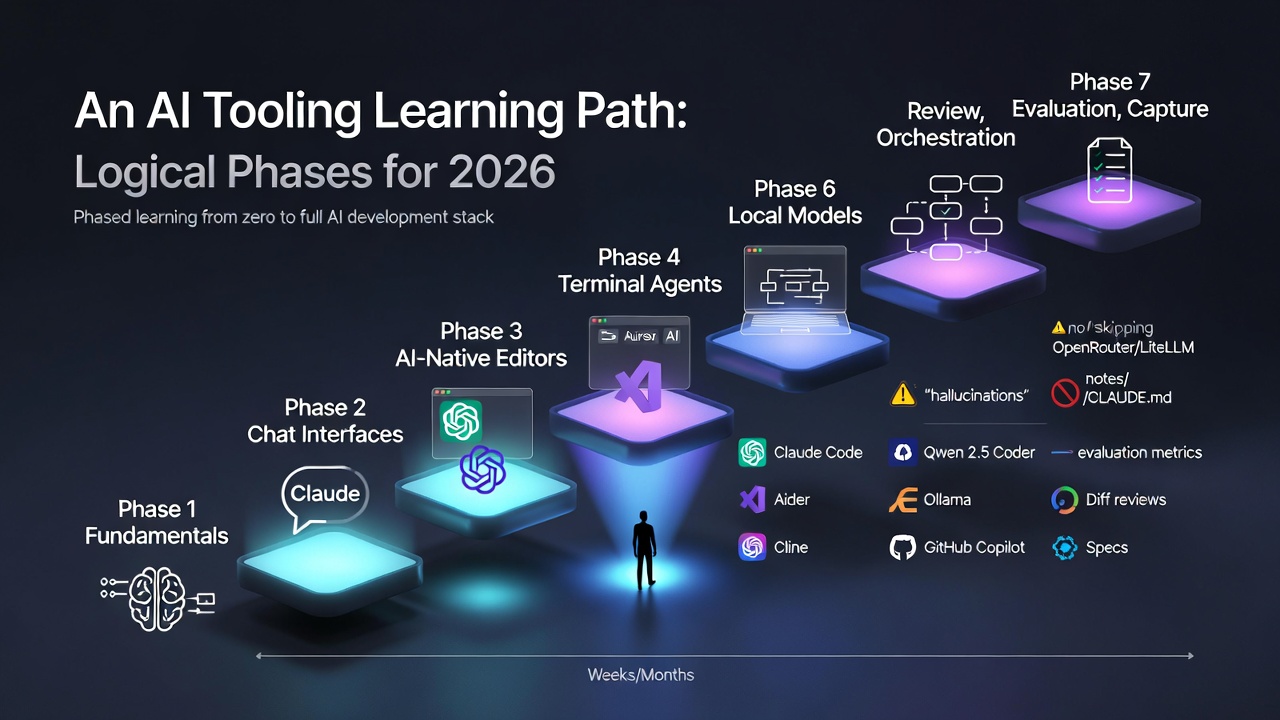
This guide documents a highly productive, AI-driven development stack using cloud-based LLMs, terminal tools, IDEs, and mobile access. It is designed for developers who want persistent workflows, AI-powered coding assistance, and flexible access from multiple devices. TL;DR Primary IDE: Cursor AI for daily work, Claude Code CLI for multi-file refactors. Local completions: Ollama with Qwen 2.5 Coder or Llama 3.3 to keep latency low and costs at zero. Routing: OpenRouter as a single API gateway; LiteLLM if you want fallback chains. Persistence: tmux sessions survive disconnects; Tailscale makes your MacBook reachable from an iPhone without port forwarding. Total baseline: around $20/month (Cursor only) scaling to $40-50/month plus API usage for the full stack. Architecture Overview Hardware & Connectivity An iPhone connects over Tailscale VPN to a MacBook Air. The MacBook runs tmux or zellij for session persistence, alongside Lungo or Patterned as keep-awake utilities. ...

April 3, 2026 · 10 min · James M

Claude Code Source Leak: Anthropic's 2,000-File Exposure and What It Means

TL;DR An internal debugging file was accidentally included in a public package update, exposing a compressed archive of roughly 500,000 lines of code across around 2,000 files - not a breach, but a packaging mistake The leaked material revealed unreleased features including persistent memory, an always-on autonomous background assistant, and multi-device remote access Competitors gained rare visibility into Anthropic’s development pipeline and longer-term product direction, which is the primary competitive damage The incident undermines Anthropic’s safety-first positioning, particularly because it was the second such exposure in just over a year The broader lesson for the AI industry: internal operational security is becoming as critical as defending against external threats, especially as AI tools target enterprise customers Anthropic’s Claude Code has been making waves as one of the most capable AI coding assistants available, but a significant internal leak has exposed the underlying technology behind the platform for the second time in just over a year. The incident raised fresh concerns about how the company handles sensitive internal information and operational security. ...

April 1, 2026 · 4 min · James M

We Are Learning to Buy Intelligence

TL;DR For most of history, usable intelligence - the kind that solves complex problems - required hiring expensive specialists or spending years acquiring expertise yourself Research shows the cost of running AI capability has been falling roughly an order of magnitude every one to two years, making intelligence increasingly affordable Intelligence is becoming infrastructure - like electricity or compute, available on demand through APIs rather than locked inside individuals or institutions When intelligence is cheap and abundant, creativity becomes the limiting factor, not knowledge, credentials, or access to experts This democratisation is extraordinary, but the question of how we deploy these tools wisely matters as much as the capability itself For most of human history, intelligence has been scarce. Not intelligence in the biological sense - people have always been clever - but usable intelligence. The kind that helps you design a system, debug a problem, write code, plan a strategy, analyse data, or turn a vague idea into something real. ...

March 11, 2026 · 5 min · James M

Claude Code Just Got a Serious Code Review Feature

TL;DR Claude Code’s new Code Review feature dispatches multiple AI agents in parallel to review a PR from different angles, rather than running a single shallow model pass over the diff The motivation is real: Anthropic’s internal code output per engineer increased by around 200%, making human review the bottleneck - and humans consistently miss subtle bugs on large diffs Multi-agent review cross-checks findings, filters false positives, and ranks issues by severity before posting a clean, high-signal review comment plus inline annotations Review depth scales with PR size; typical runs take about 20 minutes and cost $15 - $25, which is cheap compared to the cost of a production bug Humans still approve PRs - the tool’s role is a thorough pre-review pass, not automated sign-off, making it a complement to human judgment rather than a replacement I genuinely think a lot of people still underestimate how fast the AI developer tooling ecosystem is evolving. ...

March 9, 2026 · 5 min · James M